How to Use Buy Boost (Step by Step)
Buy Boost lets you borrow at a higher LTV when the loan proceeds buy crypto on Lantern. Here's how it works, what the screens look like, and when it makes sense.
By Lantern Finance
A decent number of borrowers take out a loan for one reason: to buy more crypto they are bullish on. Buy Boost is built for exactly that. When your loan proceeds go toward purchasing the same crypto as your collateral type on Lantern, you can borrow at a higher LTV than a standard loan allows, while keeping the LTV at a healthy level.
We used to do this manually, one borrower at a time. It's now self-serve in the app.
What Buy Boost actually changes
A standard Lantern loan caps at your asset's initial maximum LTV. Buy Boost raises that cap when the money is being used to buy crypto through us:
Standard LTV cap | With Buy Boost |
50% (BTC, ETH, SOL) | 100 % |
40% (XRP, LTC) | 67% |
33% (XLM, ADA, HBAR, SUI, BCH, LINK) | 50% |
25% (DOGE, XDC) | 33% |
Same interest rate. No extra fee for using it. The standard 1% buy fee applies, exactly as it would on any purchase.
The part that confuses people
An 100% LTV sounds alarming, because our liquidation threshold is 75%. Here's why those two numbers don't collide.
The boosted LTV applies at the moment of purchase. The crypto you buy lands in your account as collateral, which immediately pulls your LTV back down. You are never sitting at 100% LTV in practice.
For instance, you hold $100,000 of BTC and use Buy Boost at 100%:
You borrow $100,000 against your $100,000 of BTC. On paper, that's 100% LTV.
You buy $99,000 of crypto with it ($100,000 minus the 1% buy fee, and an upfront fee if applicable).
That purchase is added to your collateral. You now hold $199,000 of collateral against an $100,000 loan.
Your LTV settles at ~50%.
The 100% LTV exists for a moment inside a single transaction. Where you actually land afterwards is a ~50% LTV loan.
Buy Boost vs a standard loan, side by side
Same $100,000 of BTC, both used to buy more crypto:
Standard loan (50%) | Buy Boost (100%) | |
Starting collateral | $100,000 | $100,000 |
Amount borrowed | $50,000 | $100,000 |
Crypto purchased (after 1% fee) | $49,500 | $99,000 |
Collateral after purchase | $149,500 | $199,000 |
Final LTV | 33% | 50 % |
Added crypto exposure | none | +$49,500 |
Buy Boost gets you roughly twice more crypto for the same initial collateral, and still leaves you well below our 65% margin call threshold.
The honest tradeoff. A 50% LTV has less cushion than a 33% LTV. Run the same two positions against a falling market:
The standard loan at 33% absorbs a 48% drawdown before it hits a margin call.
The Buy Boost loan at 50% absorbs a 23% drawdown before it hits a margin call.
In addition, borrowing at an 100% vs a 50% LTV would also mean that your loan amount is larger, meaning more interest and upfront fees, if applicable, all else being equal.
Step by step
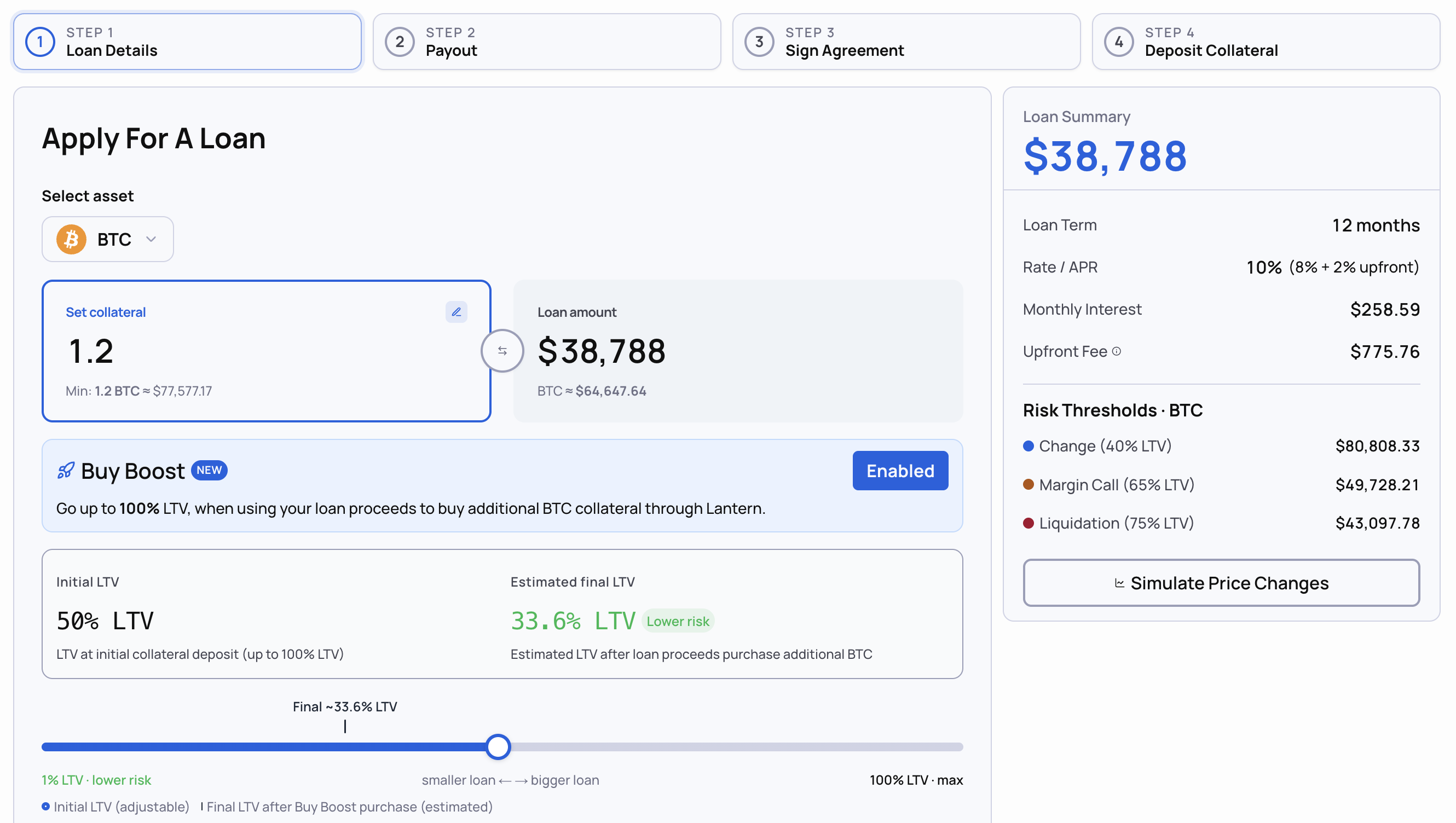
Step 1: Start a loan and pick your collateral
Choose the asset you're borrowing against. Your standard LTV cap shows here.
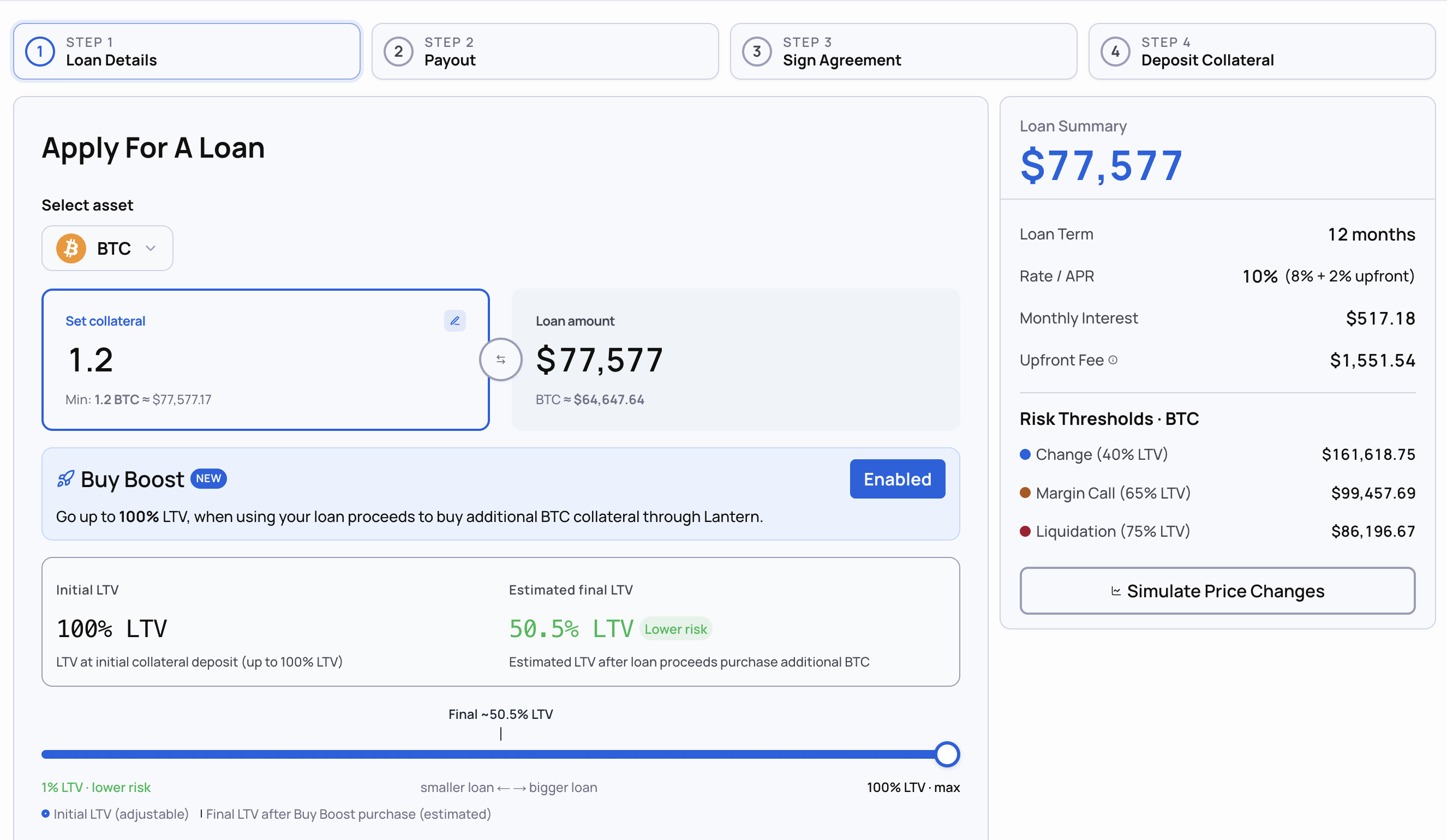
Step 2: Turn on Buy Boost
Enable Buy Boost. Your available LTV updates to the boosted tier for that asset.
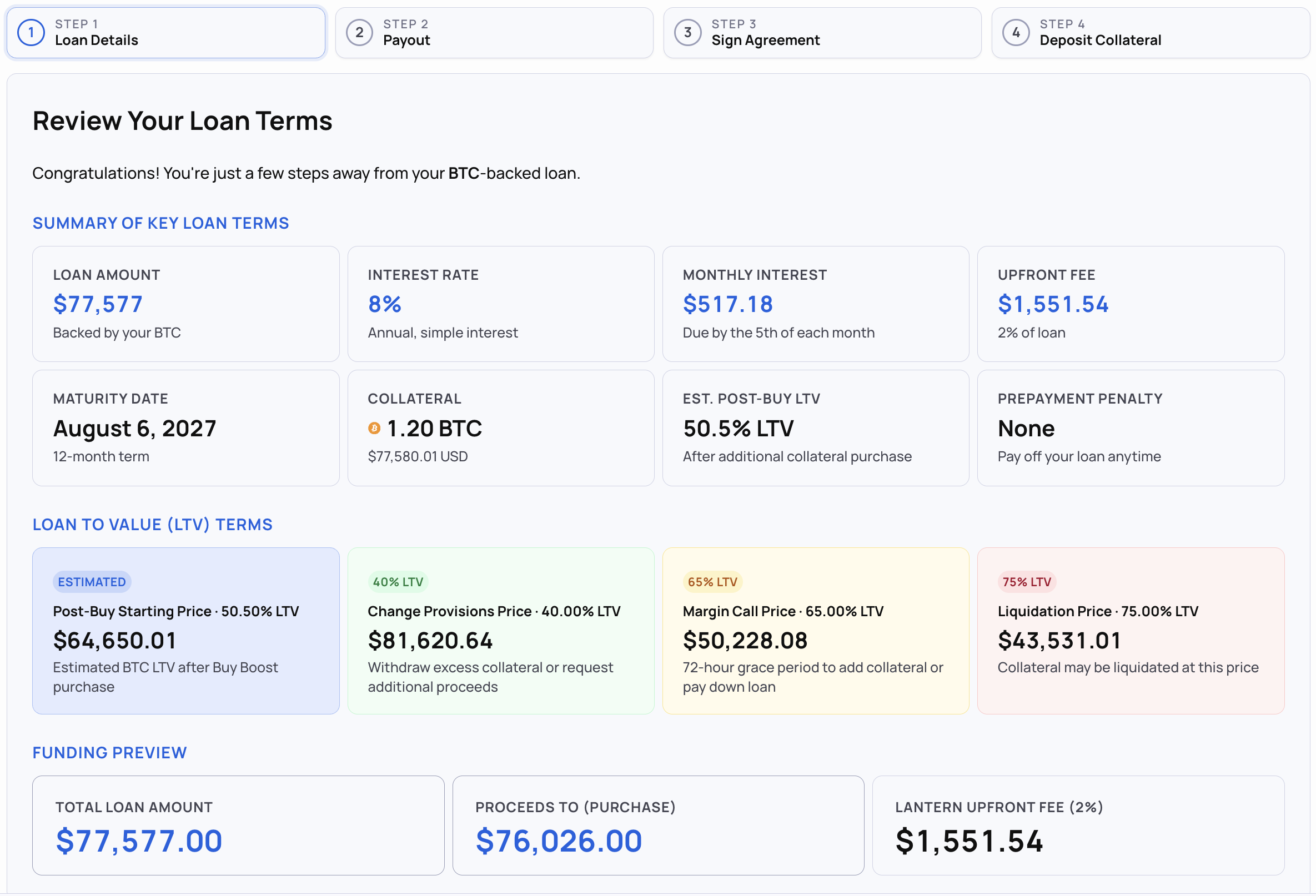
Step 3: Review and confirm
Check the summary: loan amount, fee, and your LTV. Confirm.
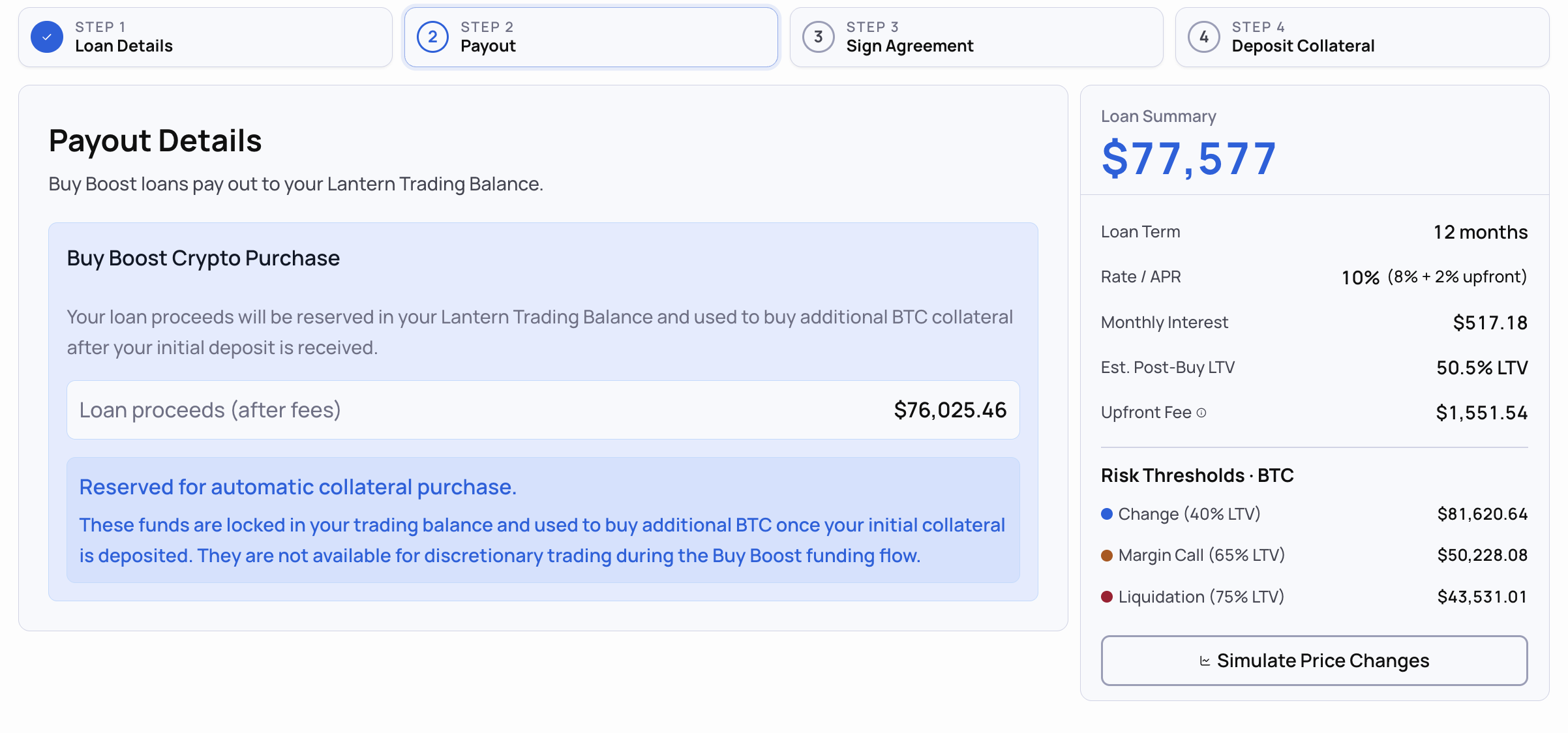
Step 4: Confirm the payout amount
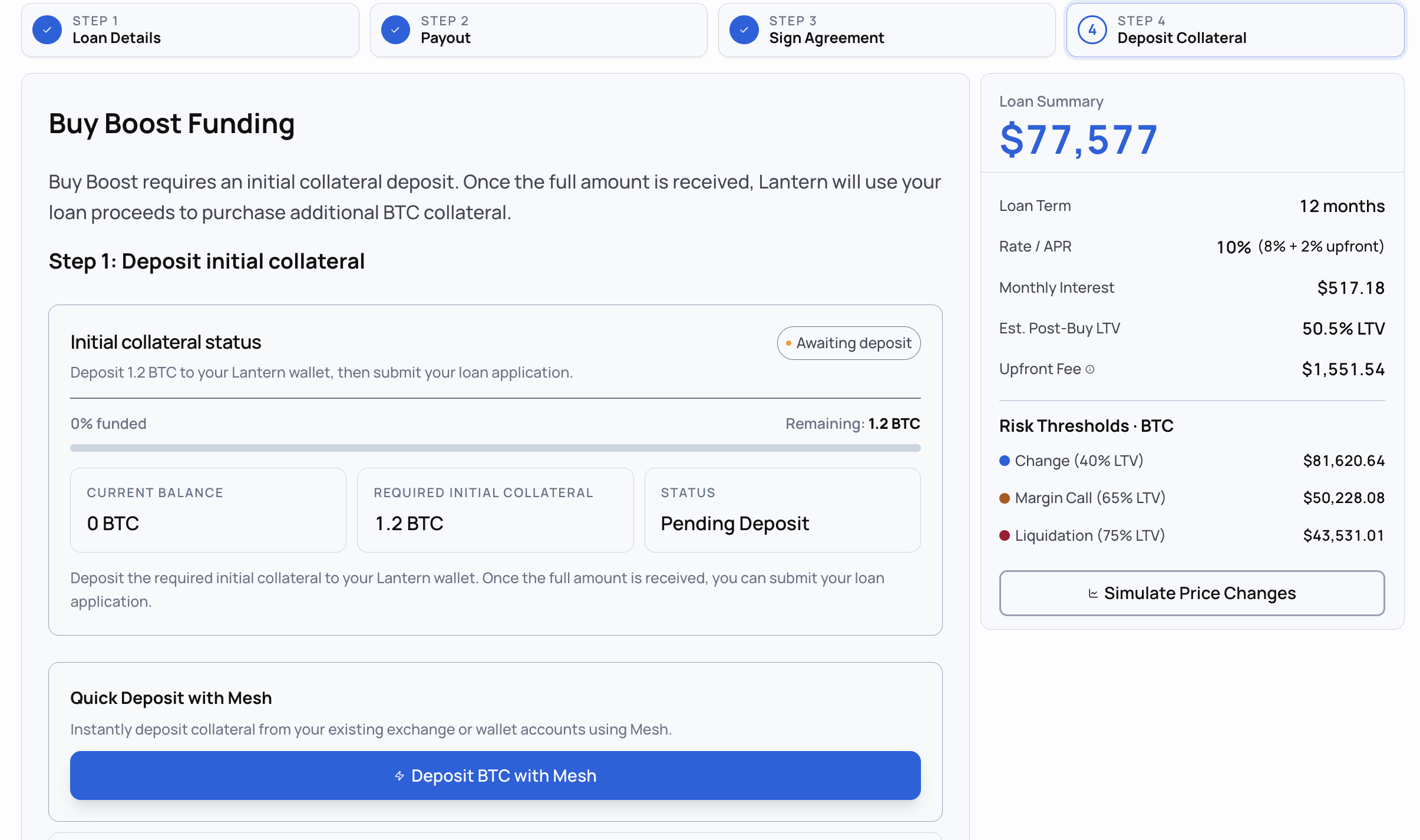
Your loan proceeds will be reserved in your Trading Balance and be used to buy additional BTC collateral.
Step 5: Deposit collateral
Once you deposit collateral, Lantern will automatically use your loan proceeds to purchase additional BTC collateral.
When Buy Boost is a good idea
It makes sense when:
You were going to buy more crypto anyway, and you'd rather not sell anything to do it.
You're comfortable with the settled LTV, not just the headline boost number.
You want the position and the loan in one place, with the collateral posted automatically.
Think twice when:
You'd be uncomfortable with a 23% drawdown. Check the cushion math above against the number you can actually stomach.
You need the cash for something other than buying crypto. A standard loan is the right tool. Buy Boost only applies to crypto purchases made on Lantern.
You're already close to your margin call zone on an existing loan.
Where your LTV sits after you boost
Our thresholds don't change when you use Buy Boost:
Below 60%: green. Plenty of cushion.
60% to 65%: watch zone. Stay alert, but you have time.
65%: margin call triggers, and a 72-hour grace period starts.
75%: liquidation, after the grace period expires.
We charge 0% liquidation fees, and give you ample time to address your margin call.
Full detail on the alert logic is in Changes To Our Margin Call And Liquidation Policy.
Ready to try it? Buy Boost is live in your dashboard now (currently restricted for business accounts and clients in NY and VT).
Start a loan here: https://lantern.finance/borrow
This post is for educational purposes only and does not constitute financial advice. Always consult with your financial advisor before making lending decisions.